WEB APP
VentureForge Portal is a comprehensive digital solution designed to simplify business formation, financial services, and compliance processes for entrepreneurs and enterprises. Built for a Mauritius-based corporate services provider, this platform streamlines company registration, visa assistance, and business account opening with a user-centric approach.
Note: Due to Strict NDA restrictions, project details such as the original name and certain UI elements have been modified. The case study showcases my approach to UX design while maintaining confidentiality.
VentureForge Portal
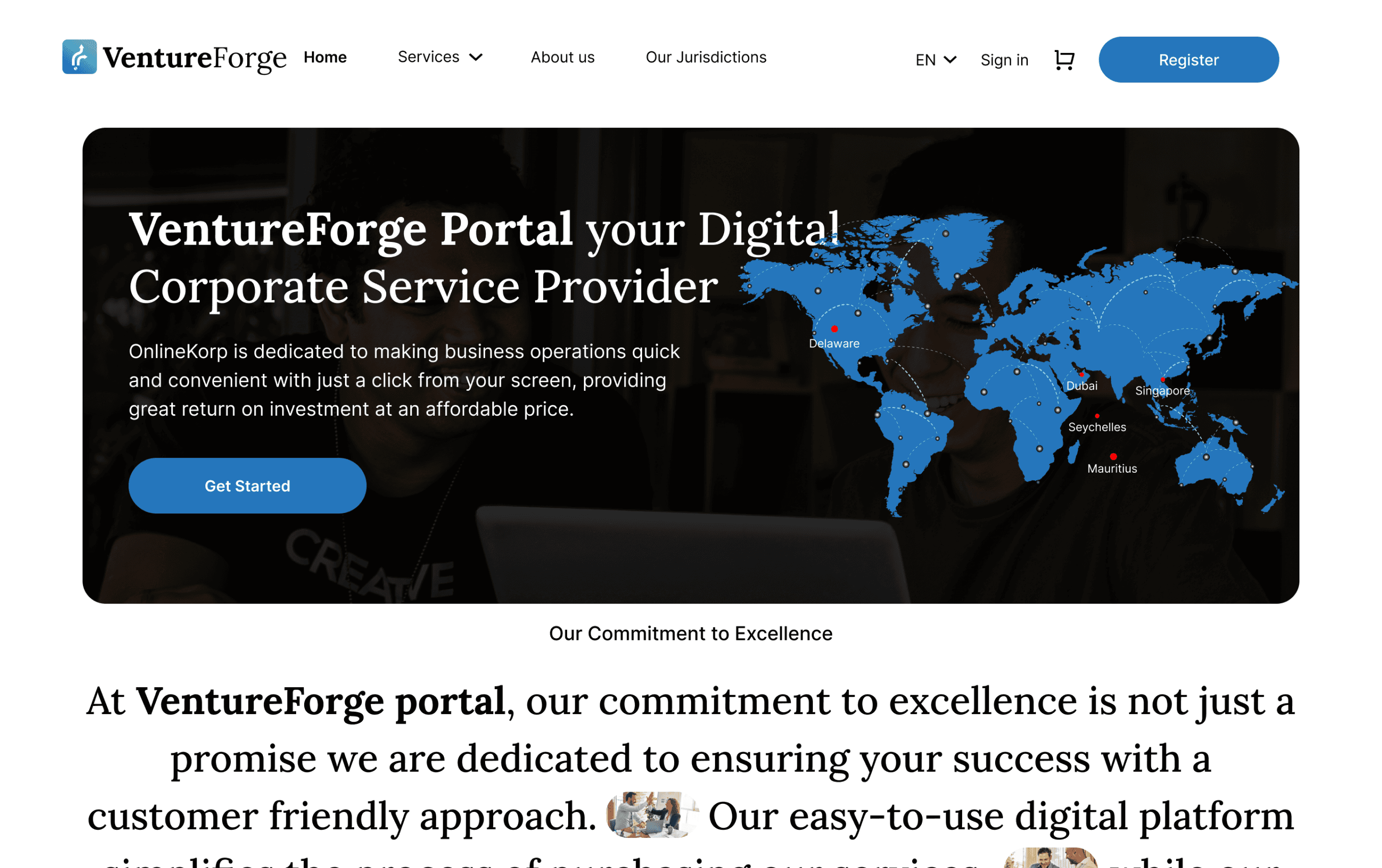
Macbook Air
UI / UX Designer
My role
Deliverables
UX Research
Wireframes
High Fidelity Designs
Logo Files
3 months
Timeline
Figma
FigJam
Adobe Illustrator
Jira
Tools
Skills
Product Thinking
Competitive Analysis
Visual Design
User Research
Logo Design
Measurable Impact of VentureForge Portal
Enhancing efficiency, user engagement, and accessibility for entrepreneurs worldwide.
Total companies formed
46,000+
Improvement System Efficiency
80%
Feature Adoption Rate
30%
Increase in User Engagement
40%
Starting or expanding a business often involves complicated paperwork, regulatory hurdles, and a lack of clear guidance. Entrepreneurs struggle with:
Lengthy Registration Process: Multiple steps and manual paperwork slow down business setup.
Unclear Pricing & Hidden Costs: Lack of transparency makes financial planning difficult.
No Real-Time Tracking: Users struggle to monitor application progress, causing delays.
Limited Support & Guidance: Entrepreneurs lack step-by-step assistance, leading to errors.
Problem Statement

We conducted:
Stakeholder interviews to understand pain points in business formation.
User surveys with entrepreneurs to identify common challenges.
Competitor analysis to uncover gaps in similar platforms.
Key Insights:
Users needed a step-by-step registration guide.
They wanted transparent pricing with no hidden fees.
A real-time tracking system would reduce uncertainty and improve experience.
User-Centered Design Approach
Research Processes
To address these challenges, we applied a User-Centered Design (UCD) process focused on real user needs.
From Onboarding to Action: The User Flow Breakdown


COMPETITIVE ANALYSIS
Competitive Analysis Insights
AI Assistant FAQ 2. Users Can Ask Questions 3. Fraud Detection 4. Customer Friendly Design + Flow
Transparent Pricing 6. Easy Flow to Get the Service
Unique Key Features Identified
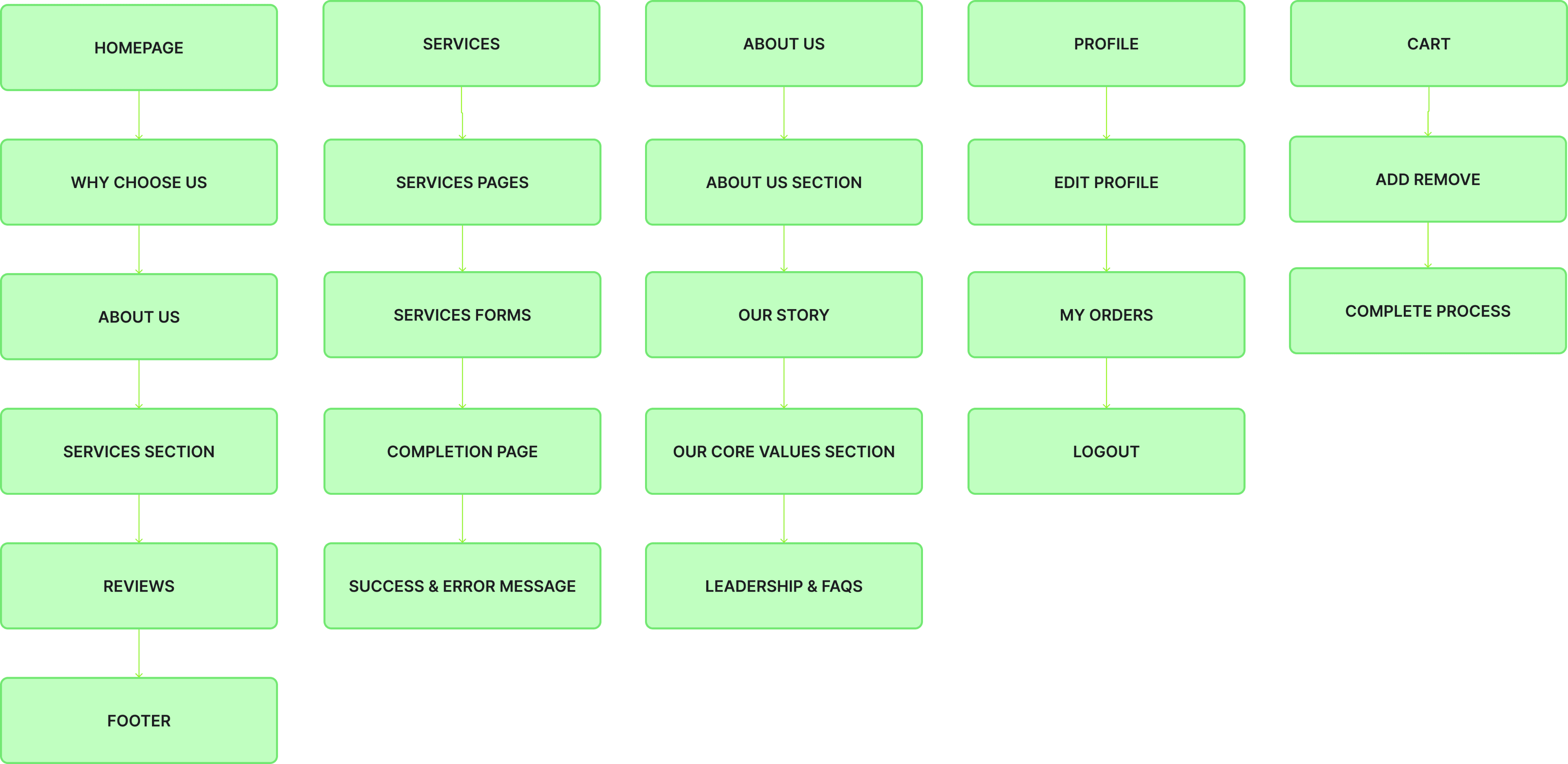
Information Architecture
Structuring Seamless Navigation with Information Architecture
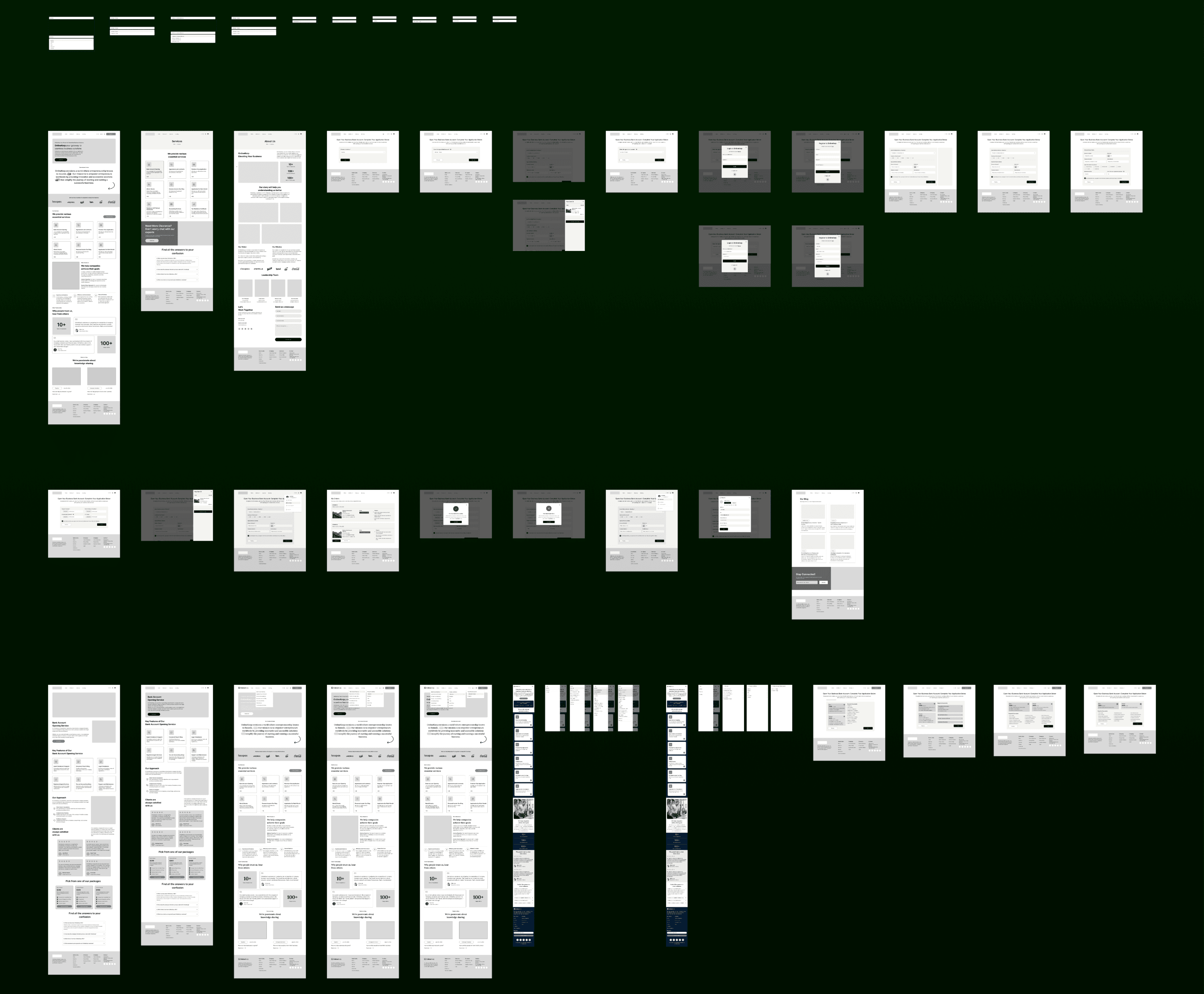
Wireframing
I explored 300+ wireframes to craft a visually engaging and user-friendly interface for the VentureForge Portal, ensuring seamless navigation, clear information architecture, and an intuitive user experience to drive efficiency and engagement.
The VentureForge Portal color system is designed to establish a sense of trust, professionalism, and modern innovation, aligning with the platform’s mission of simplifying business operations for entrepreneurs. Each color has been carefully selected to enhance functionality, improve user experience, and ensure accessibility.
Color System
#2475BB
#66CDAA
#2475BB
Typography
Extra small text Style
small text Style
Normal text Style
Large text Style
Large Title 1
Normal Title 2
X-Large Title 1
X-Large Title 2
Accessibility Check
Contrast Ratio
4.84:1
#66CDAA
#FFFFFF
#031B32
Dynamic Arrows: The three upward-moving arrows symbolize business expansion, strategic decision-making, and forward progress. They represent the various paths entrepreneurs can take, reinforcing the idea that VentureForge simplifies and streamlines complex business journeys.
Gradient (Teal to Blue): The smooth transition from teal to blue signifies trust, innovation, and steady growth, reflecting how the platform supports businesses from inception to success.
Global Element: The small globe icon at the base highlights the platform’s international accessibility, scalability, and worldwide impact, empowering entrepreneurs across borders.
Logo Design
VentureForge Portal Logo: A Symbol of Growth & Global Navigation
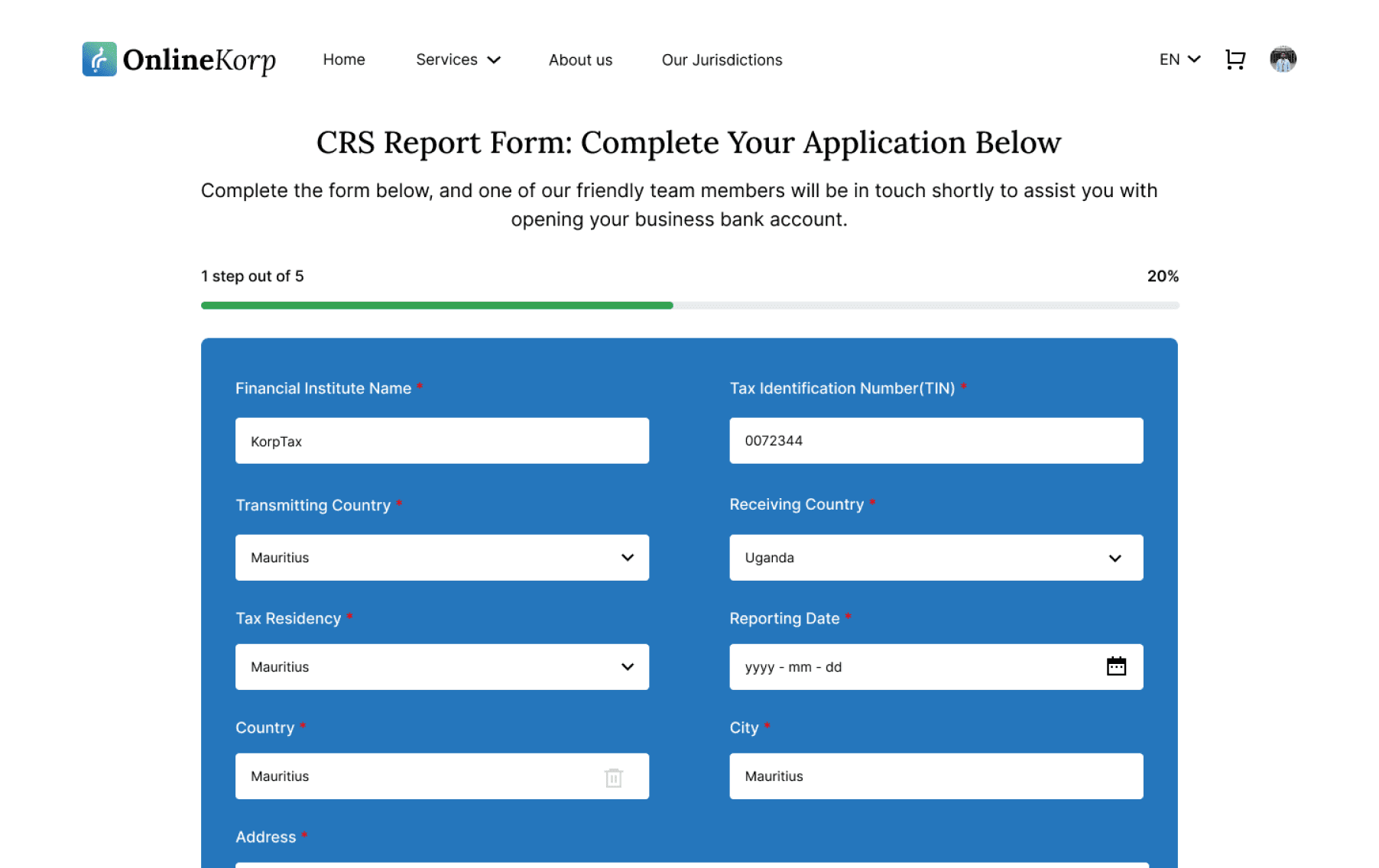
A seamless, intuitive, and efficient experience—bringing the VentureForge Portal to life with a user-centric approach.
Macbook Air
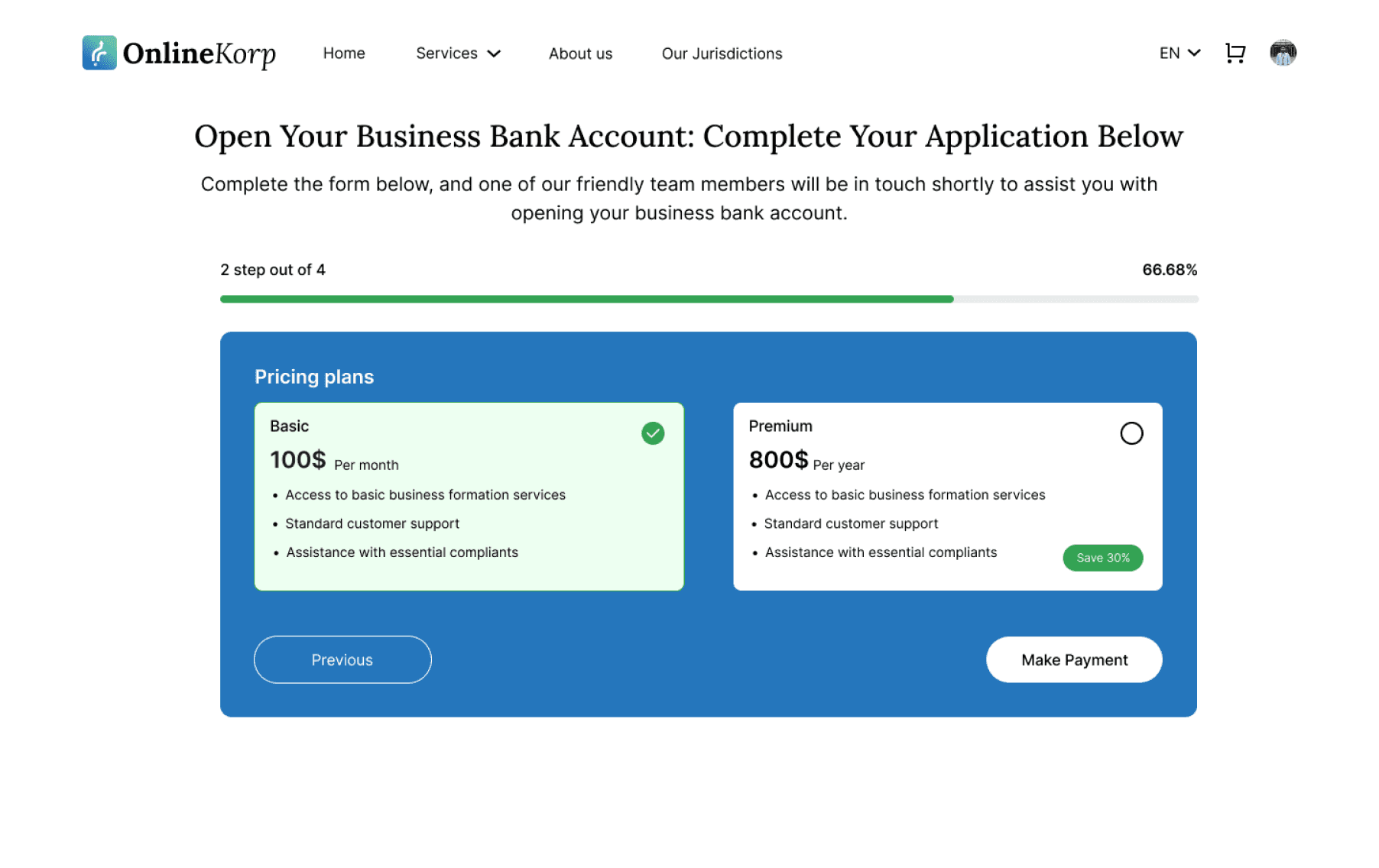
Step-by-Step Guided Input: Reduces cognitive load and errors, making form completion seamless, enhancing system efficiency by 80%.
Clear Call-to-Action (CTA): Direct and actionable buttons improve interaction rates, leading to a 90% improvement in feature adoption
Final Design Showcase
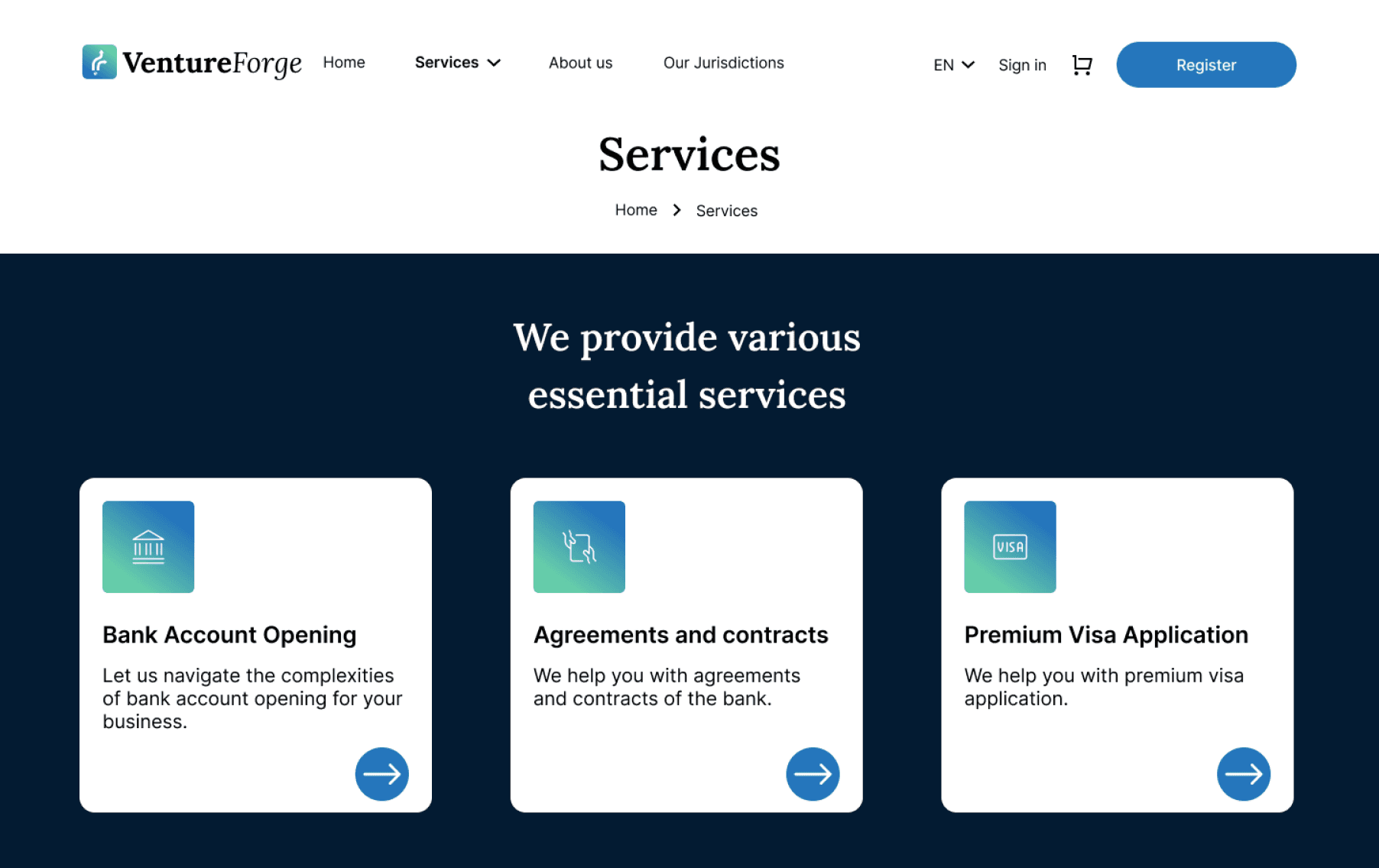
Simplified Service Discovery: Users can easily compare and select the right service, reducing decision fatigue, contributing to a 40% increase in user engagement.
Clear Call-to-Action (CTA): Direct and actionable buttons improve interaction rates, leading to a 90% improvement in feature adoption
Macbook Air
Simplified Service Discovery: Users can easily compare and select the right service, reducing decision fatigue, contributing to a 40% increase in user engagement.
Clear Call-to-Action (CTA): Direct and actionable buttons improve interaction rates, leading to a 90% improvement in feature adoption
Macbook Air
User Friction Reduces Engagement: Complicated steps discourage users from completing the process.
Transparency Builds Trust: Clear pricing and real-time tracking improve user confidence.
Progressive Disclosure Works: Breaking down forms into steps makes the process feel easier.
Data-Backed UX Decisions Are Key: Continuous feedback helps refine user journeys.
Learnings
80% System Efficiency Improvement: Optimized workflows reduced processing time.
86% User Retention Growth: Clearer guidance and tracking led to higher completion rates.
40% Increase in Engagement: Simplified navigation and intuitive UI kept users active.
90% Feature Adoption: Users quickly adapted to the improved registration system.
Outcomes
Feel free to explore my other projects to dive into my design process. You can contact me on my krishnakakade77@gmail.com
Thank you :)
Made by Krishnadevz © 2024
WEB APP
VentureForge Portal is a comprehensive digital solution designed to simplify business formation, financial services, and compliance processes for entrepreneurs and enterprises. Built for a Mauritius-based corporate services provider, this platform streamlines company registration, visa assistance, and business account opening with a user-centric approach.
VentureForge Portal
Note: Due to Strict NDA restrictions, project details such as the original name and certain UI elements have been modified. The case study showcases my approach to UX design while maintaining confidentiality.
Macbook Air
UI / UX Designer
My role
3 months
Timeline
Figma
FigJam
Adobe Illustrator
Jira
Tools
Skills
Product Thinking
Competitive Analysis
Visual Design
User Research
Logo Design
High Fidelity Designs
Logo Files
Measurable Impact of VentureForge Portal
Enhancing efficiency, user engagement, and accessibility for entrepreneurs worldwide.
Total Companies formed
46K+
System Efficiency
80%
Adoption Rate
30%
User Engagement
40%
Deliverables
UX Research
Wireframes
Starting or expanding a business often involves complicated paperwork, regulatory hurdles, and a lack of clear guidance. Entrepreneurs struggle with:
Problem Statement
Lengthy Registration Process: Multiple steps and manual paperwork slow down business setup.
Unclear Pricing & Hidden Costs: Lack of transparency makes financial planning difficult.
No Real-Time Tracking: Users struggle to monitor application progress, causing delays.
Limited Support & Guidance: Entrepreneurs lack step-by-step assistance, leading to errors.
User-Centered Design Approach
Research Processes
We conducted:
Stakeholder interviews to understand pain points in business formation.
User surveys with entrepreneurs to identify common challenges.
Competitor analysis to uncover gaps in similar platforms.
Key Insights:
Users needed a step-by-step registration guide.
They wanted transparent pricing with no hidden fees.
A real-time tracking system would reduce uncertainty and improve experience.
From Onboarding to Action: The User Flow Breakdown
COMPETITIVE ANALYSIS
Competitive Analysis Insights
AI Assistant FAQ
Users Can Ask Questions
Fraud Detection
Customer Friendly Design + Flow
Transparent Pricing
Easy Flow to Get the Service
Unique Key Features Identified
Information Architecture
Structuring Seamless Navigation with Information Architecture
Wireframing
I explored 300+ wireframes to craft a visually engaging and user-friendly interface for the VentureForge Portal, ensuring seamless navigation, clear information architecture, and an intuitive user experience to drive efficiency and engagement.
Color System
The VentureForge Portal color system is designed to establish a sense of trust, professionalism, and modern innovation, aligning with the platform’s mission of simplifying business operations for entrepreneurs. Each color has been carefully selected to enhance functionality, improve user experience, and ensure accessibility.
Typography
Extra small text Style
small text Style
Normal text Style
Large text Style
Large Title 1
Normal Title 2
X-Large Title 1
X-Large Title 2
Contrast Ratio
4.84:1
Accessibility Check
#2475BB
#66CDAA
#2475BB
#66CDAA
#FFFFFF
#031B32
Logo Design
VentureForge Portal Logo: A Symbol of Growth & Global Navigation
Dynamic Arrows: The three upward-moving arrows symbolize business expansion, strategic decision-making, and forward progress. They represent the various paths entrepreneurs can take, reinforcing the idea that VentureForge simplifies and streamlines complex business journeys.
Gradient (Teal to Blue): The smooth transition from teal to blue signifies trust, innovation, and steady growth, reflecting how the platform supports businesses from inception to success.
Global Element: The small globe icon at the base highlights the platform’s international accessibility, scalability, and worldwide impact, empowering entrepreneurs across borders.
Final Design Showcase
A seamless, intuitive, and efficient experience bringing the VentureForge Portal to life with a user-centric approach.
Macbook Air
Simplified Service Discovery: Users can easily compare and select the right service, reducing decision fatigue, contributing to a 40% increase in user engagement.
Clear Call-to-Action (CTA): Direct and actionable buttons improve interaction rates, leading to a 90% improvement in feature adoption
Macbook Air
Step-by-Step Guided Input: Reduces cognitive load and errors, making form completion seamless, enhancing system efficiency by 80%.
Clear Call-to-Action (CTA): Direct and actionable buttons improve interaction rates, leading to a 90% improvement in feature adoption
Macbook Air
Simplified Service Discovery: Users can easily compare and select the right service, reducing decision fatigue, contributing to a 40% increase in user engagement.
Clear Call-to-Action (CTA): Direct and actionable buttons improve interaction rates, leading to a 90% improvement in feature adoption
User Friction Reduces Engagement: Complicated steps discourage users from completing the process.
Transparency Builds Trust: Clear pricing and real-time tracking improve user confidence.
Progressive Disclosure Works: Breaking down forms into steps makes the process feel easier.
Data-Backed UX Decisions Are Key: Continuous feedback helps refine user journeys.
Learnings
80% System Efficiency Improvement: Optimized workflows reduced processing time.
86% User Retention Growth: Clearer guidance and tracking led to higher completion rates.
40% Increase in Engagement: Simplified navigation and intuitive UI kept users active.
90% Feature Adoption: Users quickly adapted to the improved registration system.
Outcomes
Thank you :)
Feel free to explore my other projects to dive into my design process. You can contact me on my krishnakakade77@gmail.com
To address these challenges, we applied a User-Centered Design (UCD) process focused on real user needs.